Using AI to Summarize GitHub Communications
Published on 01/10/2025
Recently, a team mate of mine mentioned that they have been using AI to quickly get caught up on long communication threads in Github Discussions, Issues, and Pull Requests.
This sparked my curiosity as and seemed like something that could offer a big productivity boost for me, especially as an Engineering Manager. So I decided to explore a good workflow for doing this myself.
In my explorations, I discovered some "gotchas" . I also found that there are many different ways of approaching this workflow - especially around how you choose to retrieve the data from GitHub. I'll go into all of this, as well as share the approach that I've landed on.
Gotchas
Reading content from URLs
I tried a handful of AI language models: Perplexity, ChatGPT, Claude (both via the Cursor editor's AI chat and Claude directly).
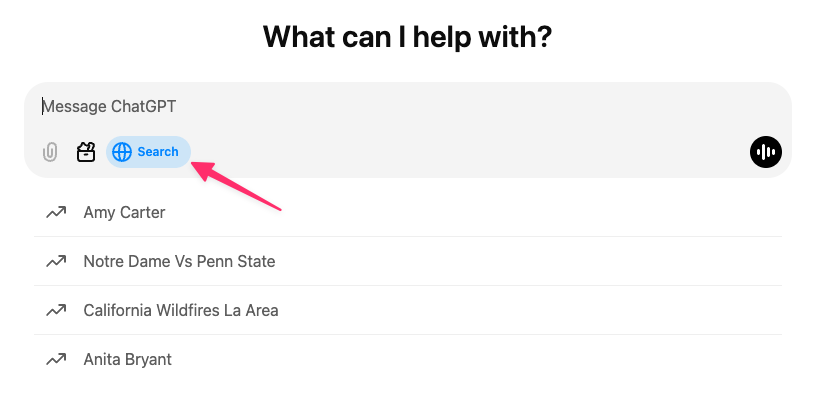
With ChatGPT, if you toggle on the Web Search option and share a URL, it seems to be able to access the info from the shared URL and summarize, answer questions, etc.
With Perplexity and Claude (both the chat within the Cursor editor and directly at https://claude.ai/), I found that they do not have real-time internet access and cannot access and provide information from web links. At least not at the time of writing this post.
For example, Perplexity responded as follows:
I apologize, but I am unable to summarize the discussion in the GitHub issue you’ve requested. The search results provided do not contain any content related to the specific GitHub issue. Without access to the actual content of the issue, I cannot provide a summary of the discussion, list key points, or outline any decisions that were made.To get the information you’re looking for, you would need to directly access the GitHub issue through a web browser or GitHub’s API. If you have access to the repository and the issue, you could review it yourself or provide the content in a format that can be analyzed.If you have any other questions or if there’s another topic you’d like to discuss, please feel free to ask.
Claude offered a similar response and linked to their documentation on the topic.
With all of this considered, it seems that exporting the content from the Issue, PR, or Discussion and importing that to the language model is the most consistent approach. This brings us to the next gotcha.
Exporting content from GitHub
There are several ways you can export your communications from GitHub, depending on what type of content you need.
For example, you can download the data as JSON, directly from the GitHub API, you can use the GitHub CLI tool, you could even save the page as HTML from the browser. I’m sure there are other ways as well.
I opted to use the GitHub CLI. I chose this route because you can not access Discussions via the REST API – there isn’t an endpoint for that. This is because Discussions were added more recently to GitHub, after they had already started moving new features to primarily use GraphQL.
My Solution
By querying the GraphQL API via the GitHub CLI, I am able to access any type of data in a consistent manner.
In the above example, the only difference between accessing the different types of content is where you see discussion in the query. For PRs, it will be pullRequest, and for Issues it will be issue. Aside from that, the queries are exactly the same.
With that similarity in mind, I put together a very simple Bash script to execute the above GitHub CLI command with a set of prompts to pass in the needed details for the query.
When running the above script, you will be prompted for the type, owner (i.e., user or organization), repo, and Issue/PR/Discussion number. These details are then used to execute the GraphQL query, pull down the JSON, and output it to a local file. I also saved the script as a Gist.
As a side note, I’ve also stored this script in a bin/ directory that is added to my $PATH so I can execute it from anywhere on my machine.
As noted above, there are many ways to do this – very likely more than what I’ve covered in this post. The main point is, once you have your export, you can load it into your AI tool of choice and get a summary, ask follow-up questions, etc. Hopefully this will save time catching up with longer communications, offering a “TL;DR” when you need it!
---
Category: AI
Tags: chatgpt, claude, cursor, github, perplexity